
Engineering blog
August 18, 2026 Michael Freeman
FieldSurvey
How FieldSurvey splits LiDAR pose on the iPhone from monitor-mode Wi-Fi (and optional HackRF spectrum) on a Raspberry Pi Sidekick, then live-streams Arrow batches into ServiceRadar. Hardware and build notes; TestFlight soon.
FieldSurvey is a walk-through Wi-Fi survey that writes into ServiceRadar. The iPhone
runs RoomPlan and ARKit for the floorplan and pose, and a Raspberry Pi Sidekick
collects RF from USB adapters in Linux monitor mode (beacons and probe responses) plus
optional HackRF One channel-energy sweeps, because iOS will not put a third-party
app's Wi-Fi radio in monitor mode. If you are signed in, the phone opens Arrow
WebSockets to web-ng and streams RF, pose, and spectrum batches as you walk, which
you can follow on
/spatial/field-surveys
;
it also checkpoints a local session so a dropped cell link does not lose the walk, and
you can resume the stream or upload the bundle later.
Hardware
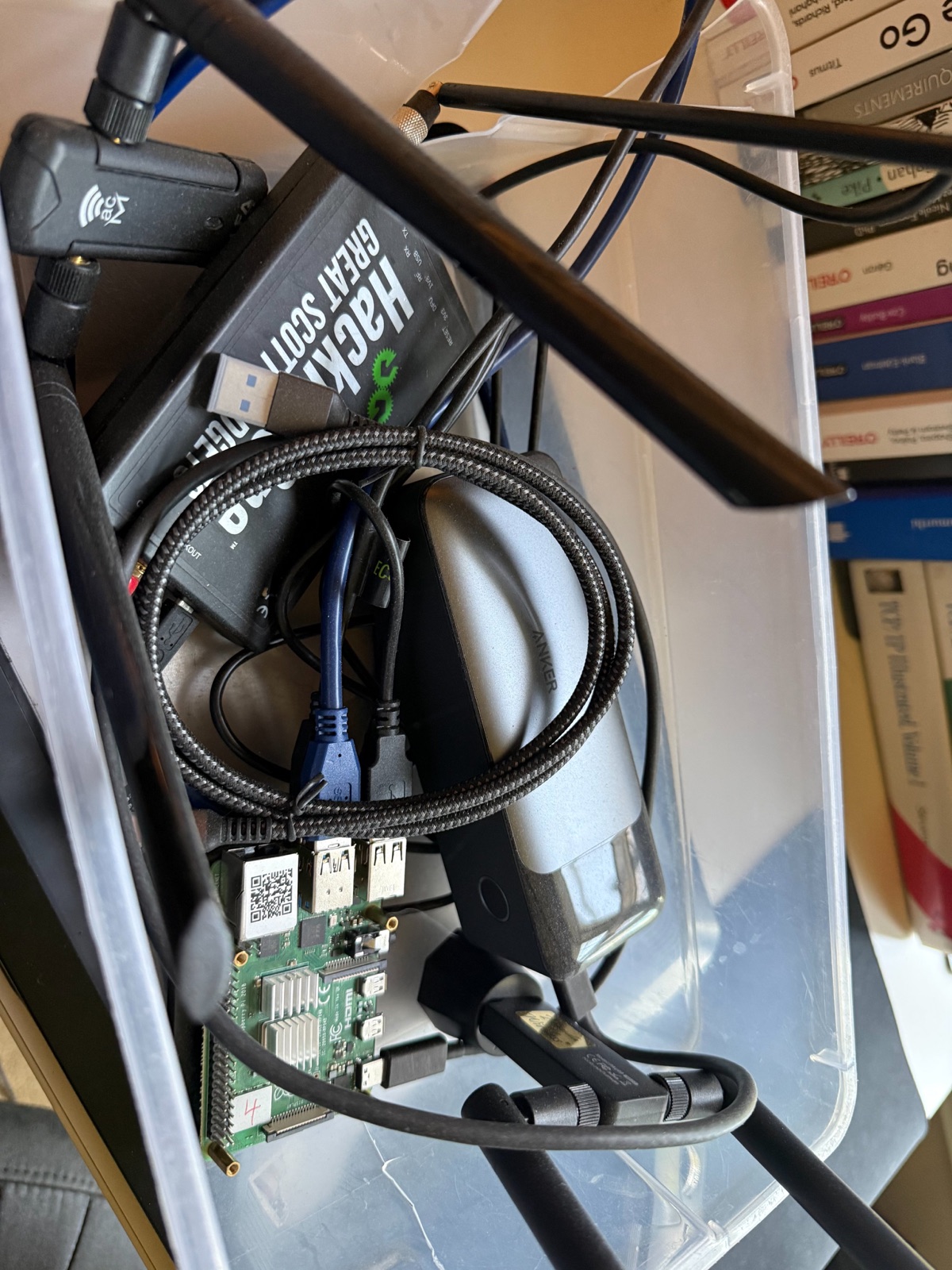
wlan0
on the phone link and use USB only for capture.
A 3D-printed clamshell for the Pi, power bank, and radios is in progress, so the photo
is the current internals. You need a LiDAR iPhone Pro (12 Pro or later, iOS 16+)
because RoomPlan uses the depth camera, and the Sidekick is a Raspberry Pi 4 with 4 GB
on 64-bit Raspberry Pi OS (a Pi 5 works) powered from an Anker 24,000 mAh 140W bank
over USB-C, which is more than the Pi needs and will also charge the phone. Capture
adapters have to expose monitor mode and radiotap through
iw
;
the ones we have verified are Ralink RT5572 (
rt2800usb
) and MediaTek MT7612U (
mt76x2u
), including Alfa's AWUS036ACM. Prefer USB 3 for the 5 GHz radio. The usual setup is
two adapters, one parked on 2.4 GHz 1/6/11 and one hopping 5 GHz, plus an optional
HackRF One that we treat as receive-only unless we know that unit's modification
history; Sidekick starts
hackrf_sweep
with the RX amp and antenna power off. Two dongles plus a HackRF usually wants a
powered hub, a 32 GB or larger microSD, and a USB-C cable.
The phone and Pi talk over IP, using iPhone Personal Hotspot over USB in the field or
ethernet / the same LAN on a bench. The daemon listens on
17321
for HTTP control and the observation WebSockets. Pairing is a one-time claim against
SERVICERADAR_SIDEKICK_API_TOKEN
that returns a device token the daemon stores only as a hash and the app keeps in the
iOS Keychain, so replace the
change-me
default in
/etc/serviceradar/fieldsurvey-sidekick.env
before you take the kit out.
Data path
Pairing, status, and radio-plan updates are JSON, but RF is Apache Arrow IPC on one
WebSocket per monitor radio, with spectrum on a separate Arrow WebSocket so BSSID
rows and power bins stay distinct. The phone downsamples onto the current ARKit pose
for the on-device map and forwards the same Arrow bytes to ServiceRadar on three
WebSockets (RF, pose, spectrum), and web-ng writes those batches into Postgres through
ADBC as they arrive:
platform.survey_rf_observations
,
platform.survey_pose_samples
,
and
platform.survey_spectrum_observations
.
A view joins RF to pose by session and timestamp, so review can follow a session that
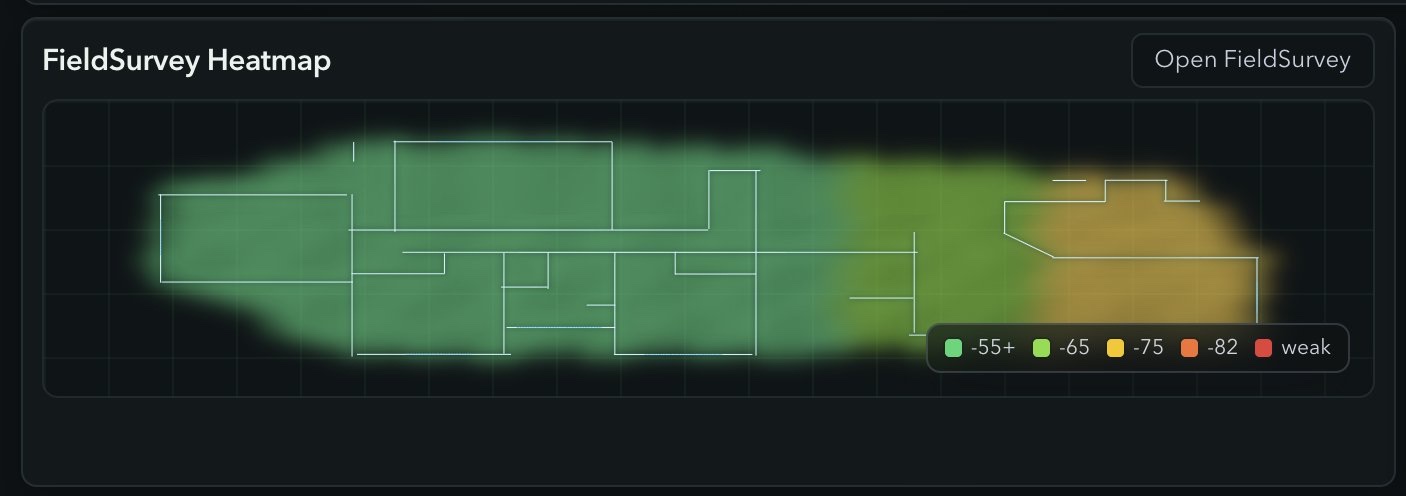
is still walking. We also persist Wi-Fi RSSI and HackRF interference rasters from the
fused rows, store floorplan artifacts in object storage on the session, and can pin a
raster on a dashboard card with
in:field_survey_rasters overlay_type:wifi_rssi has_floorplan:true sort:generated_at:desc
.
Building the Rust daemon
The crate is
serviceradar-fieldsurvey-sidekick
in
rust/fieldsurvey-sidekick
,
with Axum for HTTP, Linux
AF_PACKET
/
TPACKET_V3
mmap rings for capture, and packaging under
build/packaging/fieldsurvey-sidekick/
.
Build on the Pi, or cross-compile with
aarch64-linux-gnu-gcc
as configured in
.cargo/config.toml
(
gcc-aarch64-linux-gnu
on Debian):
git clone https://github.com/carverauto/serviceradar.git
cd serviceradar

# on the Pi:
cargo build -p serviceradar-fieldsurvey-sidekick --release

# from a laptop:
rustup target add aarch64-unknown-linux-gnu
cargo build -p serviceradar-fieldsurvey-sidekick \
  --release --target aarch64-unknown-linux-gnu
Copy the binary and packaging files to the Pi and install them. Replace
pi@pi-host
with your user and host:
scp target/aarch64-unknown-linux-gnu/release/serviceradar-fieldsurvey-sidekick \
  pi@pi-host:/tmp/serviceradar-fieldsurvey-sidekick.new

scp build/packaging/fieldsurvey-sidekick/config/fieldsurvey-sidekick.toml \
  build/packaging/fieldsurvey-sidekick/config/fieldsurvey-sidekick.env.example \
  build/packaging/fieldsurvey-sidekick/systemd/serviceradar-fieldsurvey-sidekick.service \
  pi@pi-host:/tmp/

ssh pi@pi-host '
  sudo install -m 0755 /tmp/serviceradar-fieldsurvey-sidekick.new \
    /usr/local/bin/serviceradar-fieldsurvey-sidekick
  sudo install -d -m 0755 /etc/serviceradar
  sudo install -m 0644 /tmp/fieldsurvey-sidekick.toml \
    /etc/serviceradar/fieldsurvey-sidekick.toml
  sudo install -m 0600 /tmp/fieldsurvey-sidekick.env.example \
    /etc/serviceradar/fieldsurvey-sidekick.env
  sudo install -m 0644 /tmp/serviceradar-fieldsurvey-sidekick.service \
    /etc/systemd/system/serviceradar-fieldsurvey-sidekick.service
  sudo systemctl daemon-reload
  sudo systemctl enable --now serviceradar-fieldsurvey-sidekick.service
'
curl -s http://pi-host:17321/healthz
curl -s http://pi-host:17321/status
iw dev
iw phy | sed -n "/Supported interface modes:/,/Band /p"
/status
should list the USB radios. If monitor setup fails, check that the interface is not
the management uplink and that NetworkManager is not associating the capture dongle.
The service runs as root with
CAP_NET_ADMIN
and
CAP_NET_RAW
because it reconfigures interfaces and opens packet sockets, and you will want a udev
rule if USB enumeration order changes between boots. In auto mode the iPhone ignores
the management interface, sorts monitor-capable USB radios by link speed, and assigns
5 GHz to the fastest and 2.4 GHz 1/6/11 to the next; an explicit plan looks like
wlan1:2412|2437|2462,wlan2:5180|5200|5220|5240
.
Building the iOS app
The project is
swift/FieldSurvey/FieldSurvey.xcodeproj
,
bundle id
com.serviceradar.FieldSurvey
.
Arrow Swift is vendored under
LocalPackages/arrow-swift
so the Sidekick stream and the ServiceRadar ingest share an encoding. The app needs
camera, local network, and motion permissions for RoomPlan and the USB or LAN link.
cd swift/FieldSurvey
open FieldSurvey.xcodeproj
Select a development team, plug in a LiDAR iPhone, and run the FieldSurvey scheme.
The simulator can run
SidekickClientTests
and
SignalCoverageInterpolatorTests
but cannot do RoomPlan or talk to a Pi.
xcodebuild -project FieldSurvey.xcodeproj \
  -scheme FieldSurvey \
  -destination 'generic/platform=iOS' \
  CODE_SIGNING_ALLOWED=NO \
  build
TestFlight is coming and I will add the public link here when Apple has the build. In
Settings, set the Sidekick URL to
http://<pi-host>:17321
(or
fieldsurvey-rpi.local
if you advertise mDNS), paste the setup token, claim the phone, point the backend at
your ServiceRadar instance, sign in, and run Check Backend; after that, starting a
survey streams to ServiceRadar. Leave RF scanning on. AR priority mode pauses the
Sidekick preview when tracking degrades so RoomPlan can recover, then resumes it.
Running a survey
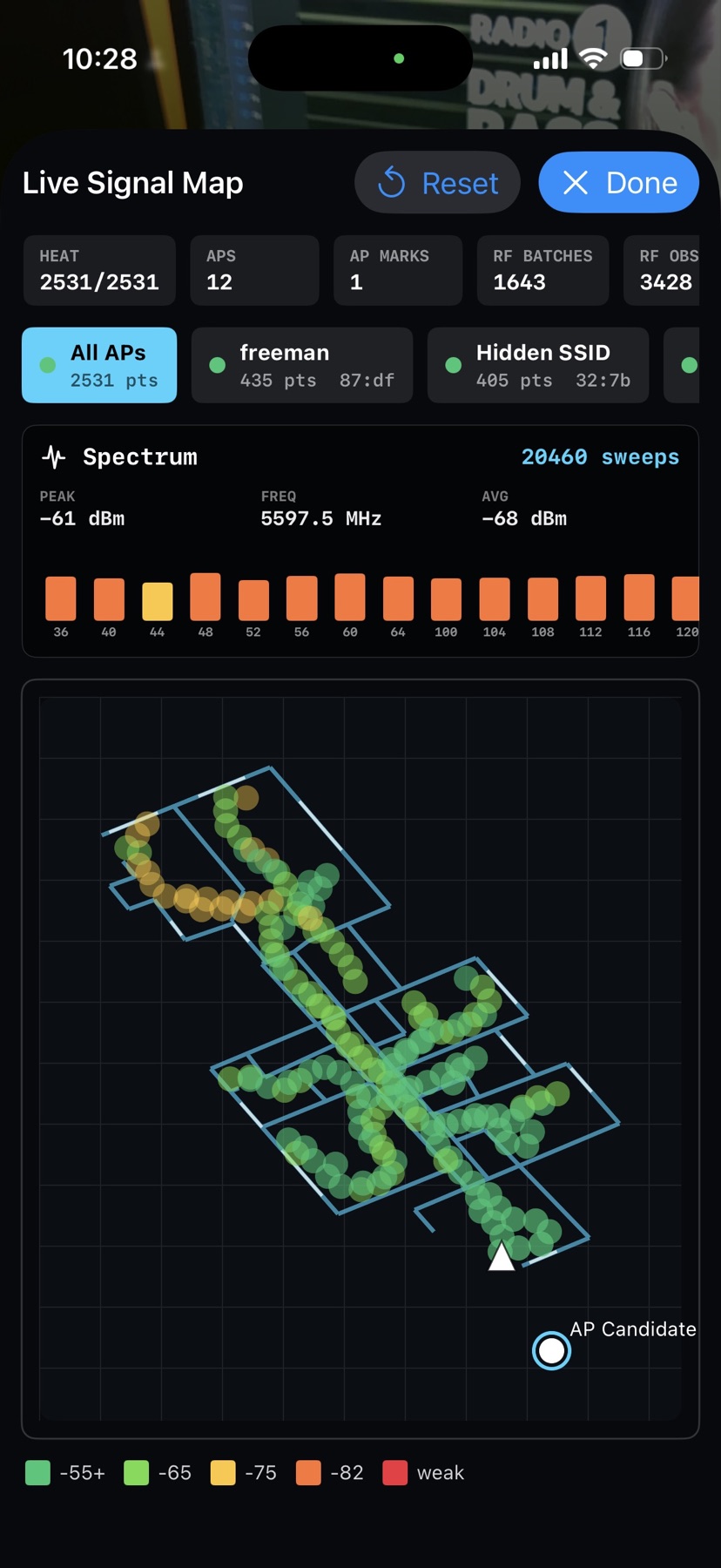
Start a full room scan, hold the phone like a camera, and walk the perimeter and then the interior. The live map should show heat points, AP chips, RF batch counts, and a climbing backend frame count if you are signed in; enable spectrum in Settings if you have a HackRF and want the spectrum bar. Manual AP marks on a closet or ceiling tile are treated as ground truth, inferred positions from RSSI gradients carry a confidence score, and HackRF energy is not used to place a BSSID. Check the 2D review on the phone before you leave. Coming back for an RF-only pass reuses the saved floorplan and requires an alignment step before new heat is written into the old coordinates.
Operator notes are in the FieldSurvey Sidekick guide. Source is rust/fieldsurvey-sidekick and swift/FieldSurvey .