
Visibility · NetFlow
NetFlow analytics and flow intelligence
See who talked to whom, which process or container owned the socket, which Kubernetes Service or Gateway owns a public VIP, where the prefixes live, whether the peer is on a threat feed, and query it in SRQL.
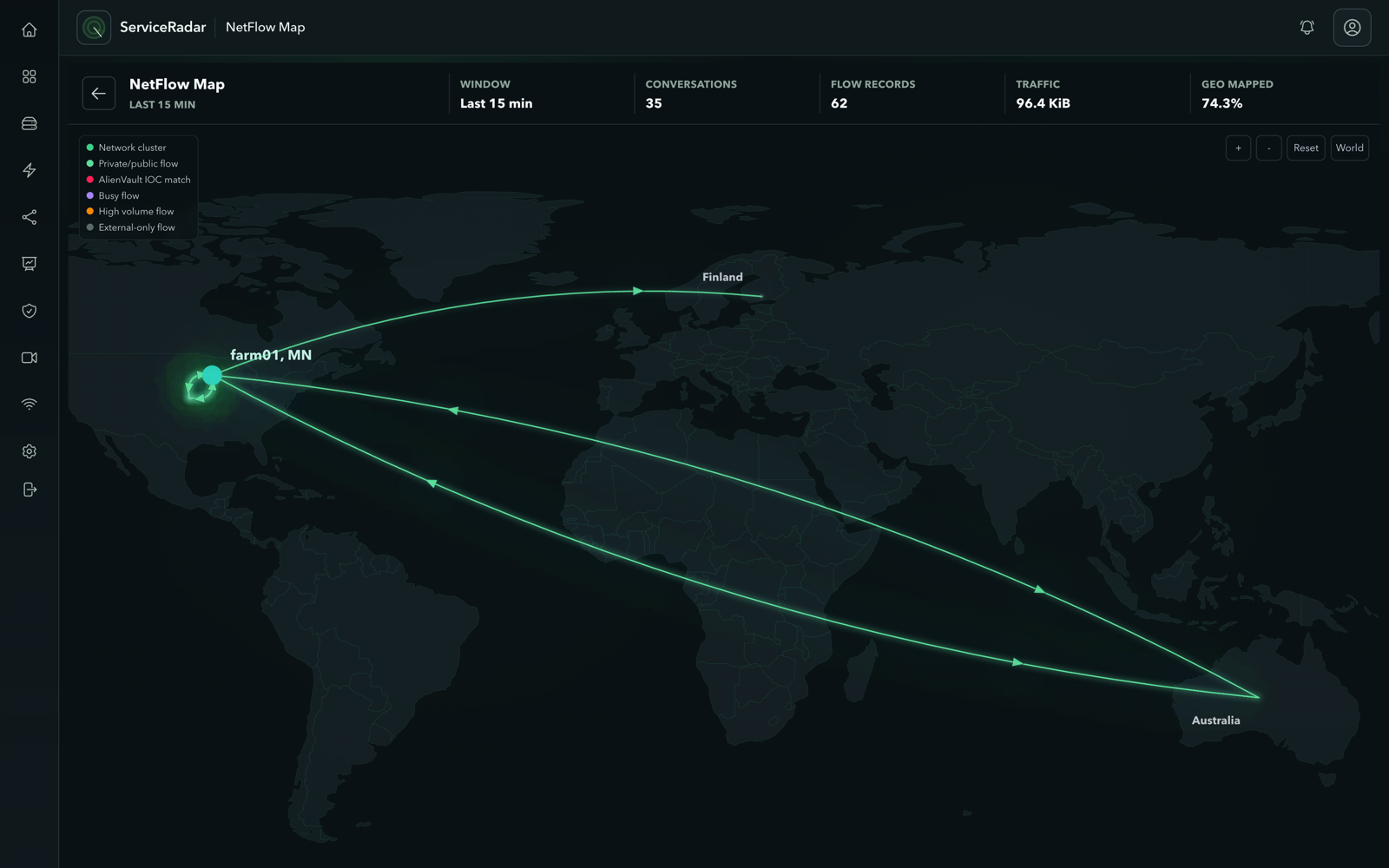
Ingest NetFlow, sFlow, and IPFIX; attribute conversations to processes, containers, and Kubernetes workloads; map public VIP destinations to Services and Gateway API routes; enrich with ASN, GeoIP, and prefix tags; correlate flows against threat-intelligence IOCs; and investigate it all with SRQL.
Collect
NetFlow, IPFIX, and sFlow
Bring flow exports from routers, switches, and firewalls into one place operators can query.
Attribute
Process, container, and Kubernetes
Connect conversations to the process, container, or workload that owned them on the host.
Enrich
CIDR tags, ASN, and GeoIP
Longest-prefix IP tags from IPAM or manual CIDRs, plus AS number and geography on the same flow.
Investigate
SRQL + threat intel
Search flows, tags, and IOC leads in one query language instead of stitching exports across tools.
NetFlow is necessary. Context is the product.
Flow exporters already tell you who talked to whom, how much traffic moved, and which interfaces were involved. Operators still end up opening other tools to answer the questions that matter: which process or container, which Kubernetes workload, which site or role, which AS path, and whether the peer is on a threat feed.
ServiceRadar collects flow telemetry and attaches that context onto the same conversation, so traffic maps and investigations start with answers instead of another round of pivot work.
Collect flow telemetry from the devices you already trust
Point routers, switches, and firewalls at ServiceRadar and keep using the export formats your network already supports: NetFlow, IPFIX, and sFlow. Multi-vendor fleets stay coherent even when many devices send data at once.
- See traffic matrices, top talkers, and destination patterns without a separate flow silo
- Keep dashboards and queries next to the rest of your operational picture
- Scale with the exporters you have today, including high-volume edges on Enterprise hosted footprints when Cloud is available
Setup detail lives in the NetFlow docs when you are ready to export.
Attribute flows to processes, containers, and Kubernetes workloads
NetFlow alone stops at the host. ServiceRadar goes further by tying conversations to what actually owned the traffic on that host.
Host process visibility
Lightweight host agents use eBPF to observe network activity and process context, so a flow can answer which application or service owned the local side of the conversation, not only which IP and port.
Containers and Kubernetes
Workload Identity adds container and orchestration context: container name and image, and on Kubernetes workers pod, namespace, and related workload details. Docker and Compose environments get container and service context the same way.
Public VIP ownership
When the destination is a cluster LoadBalancer or Gateway VIP—not a host NIC—a dedicated in-cluster inventory maps IP:port to Service, Gateway API route, MetalLB pool, and backend pod sockets. Host agents never need Kubernetes API credentials for this step.
Those layers stay independent on purpose. You can attribute processes without running Kubernetes, inventory workloads without collecting every packet, and resolve public VIP ownership without waiting for host-side DNAT visibility. When process and workload layers are enabled, they join with NetFlow so one conversation can carry host and workload identity together. Public endpoint inventory answers the separate IR question “who owns this public IP:port?” and supplies correlation hints for the post-DNAT sockets netprobe attributes.
Deeper deployment guidance: host network visibility , workload identity, and Kubernetes public endpoint inventory.
Enrich flows with ASN, prefixes, and geography
Internet-facing investigations need more than private CIDR labels. ServiceRadar adds routing and geography onto the same flow rows you already use for top talkers and path analysis.
Autonomous systems and BGP context
When devices export BGP-related flow fields, ServiceRadar can surface AS-level context so teams see transit patterns and peering impact next to volume, not in a separate routing tool.
GeoIP and ASN enrichment
Optional geography and ASN enrichment labels endpoints with country and network identity, so maps and triage can separate local traffic from distant or unexpected peers.
Combined with prefix tags, a single flow can answer both “this is guest Wi-Fi at Austin” and “the peer is a well-known public network in another region,” which is what makes traffic maps useful under pressure.
Correlate flows with threat-intelligence IOCs
Flow analytics get sharper when endpoints can be checked against current threat intelligence without exporting every conversation to a separate system first. ServiceRadar can highlight source and destination IPs that match IOCs from your feeds, so investigations start with better leads.
- Spot conversations involving known-bad or high-interest peers while reviewing traffic
- Keep severity and feed labels next to the flow for faster triage
- Treat matches as investigation leads, not automatic containment decisions
One conversation, more than a 5-tuple
ServiceRadar is designed so flow volume, process and workload identity, business tags, internet context, and threat leads land on the same story. You do not have to rebuild that join every time an incident starts.
Investigate with SRQL, the ServiceRadar Query Language
Collecting and enriching flows only helps if people can ask questions quickly. SRQL is a compact, readable query language built into ServiceRadar for searching network data in the product UI. You do not need SQL to start: describe what you want, filter by time and context, and refine from there.
For flow investigations, that means one place to move from volume and top talkers into prefix tags, destinations, attributed workloads, and threat-intel leads without exporting CSVs between tools.
What you can ask about
- Flows and traffic volume over a time window
- Tagged address space (site, role, tenant, and more)
- Conversations involving IOC or threat-feed matches
- Attributed process and workload context when host agents are enabled
How investigations usually go
- Start broad: recent flows or top talkers
- Narrow by tag, destination, or peer of interest
- Check whether the peer is on a feed
- Open the conversation for process, container, or Kubernetes context
Example questions in plain language
- Traffic from a labeled site or role. Filter flows by the prefix tags you imported from IPAM or authored yourself.
- Peers that match threat intelligence. Combine flow search with feed labels so IOC hits sit next to the conversation, not in a separate console.
- Heavy or unusual destinations. Sort and limit by volume, then pivot into tags, ASN/geo context, and attribution.
Operators type SRQL into the ServiceRadar query bar. Examples and recipes live in the SRQL tutorial and cookbook when you want copy-paste starting points.
FAQs
Which flow formats does ServiceRadar support?
NetFlow, IPFIX, and sFlow from the network devices you already operate.
Do we need flow exporters on every host for process attribution?
No. Host agents observe local process and container context and ServiceRadar joins that evidence with NetFlow that involves the host.
Can we see Kubernetes pod and namespace on a flow?
Yes. With Workload Identity enabled on the node, attributed flows can include pod, namespace, container, and image context for Kubernetes workloads.
Can we tag private ranges without NetBox?
Yes. You can define prefixes and tags manually. NetBox is the automation path when you want labels to follow IPAM.
Are threat-intel hits automatic block decisions?
No. They are investigation leads. Use them to prioritize review, not as the sole reason to contain traffic.
Do I need SQL to search flows and tags?
No. SRQL is a compact query language in the ServiceRadar UI for searching flows, prefix tags, threat-intel leads, and related network data without writing SQL.
Where does this fit hosted Cloud?
High-volume flow intake is part of the Enterprise hosted footprint. Self-managed deployments can run the open-source stack today. Pricing and signup live on the control plane when Cloud launches.
Next step
Ready to put context on every flow?
Talk through NetFlow, attribution, prefix tags, and threat-intel correlation with our technical sales team, try the public demo, or get started when Cloud signup is open.