
Operations · ServiceRadar FieldSurvey
FieldSurvey WiFi & field operations
Map LiDAR floorplans and live Wi-Fi heatmaps straight into your network inventory—keeping field teams and NOC engineers on one source of truth.
Walk a site once with an iPhone or iPad Pro and an open Sidekick kit to capture LiDAR floorplans and live Wi-Fi coverage heatmaps directly into your living network inventory—eliminating static PDF reports and disconnected survey tools.
01 · LiDAR Floorplans
Walk once, map automatically
Scan any floor with an iPhone or iPad Pro to generate accurate LiDAR floorplans on the spot—no waiting on outdated CAD files, and reuse saved maps on future site visits.
02 · Live RF Heatmaps
Spot dead zones & interference fast
See real-time Wi-Fi signal strength, access-point coverage, and RF interference right on the handheld screen while NOC engineers review live 2D and 3D heatmaps in ServiceRadar.
03 · Sidekick & iOS Kit
Open hardware, zero dongle lock-in
Pair an iPhone or iPad with an affordable Raspberry Pi Sidekick and standard USB radios—replacing $4,000+ proprietary survey kits and recurring per-seat tool licenses.
04 · Site Inventory Sync
One living source of truth
Every walk syncs directly into your live ServiceRadar inventory and site dashboards— with automatic offline backup so basements and dead zones never lose survey data.
Field-proven hardware & live console
From handheld walk-through to pinned operations heatmap
Every photo below is from real FieldSurvey site walks: the live iOS coverage map, the open Raspberry Pi Sidekick hardware kit, and the resulting site heatmap pinned directly inside ServiceRadar.
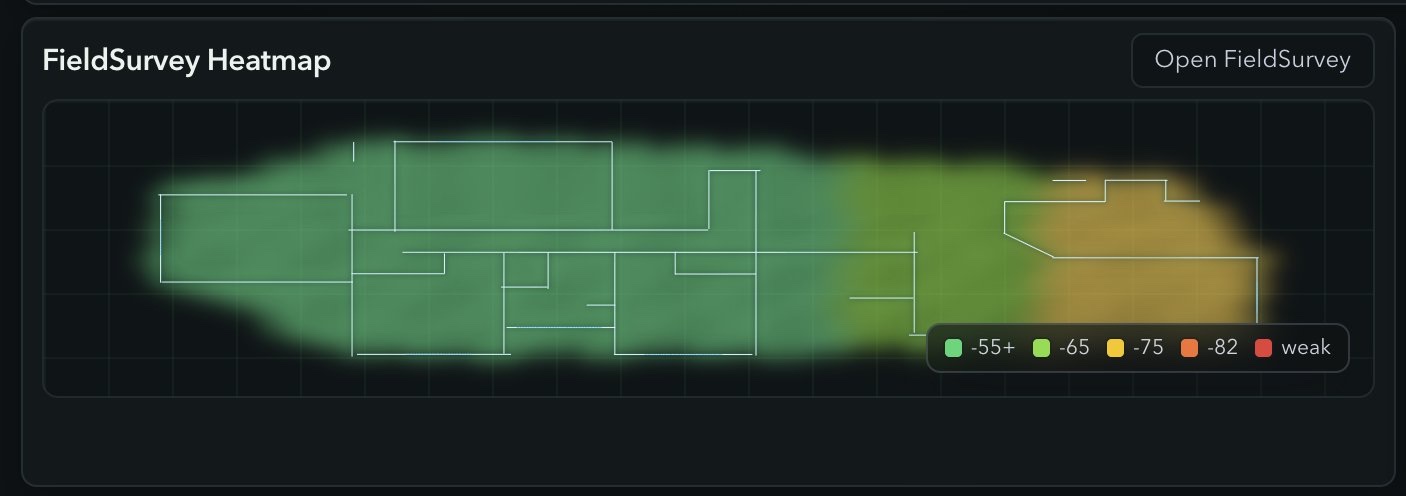
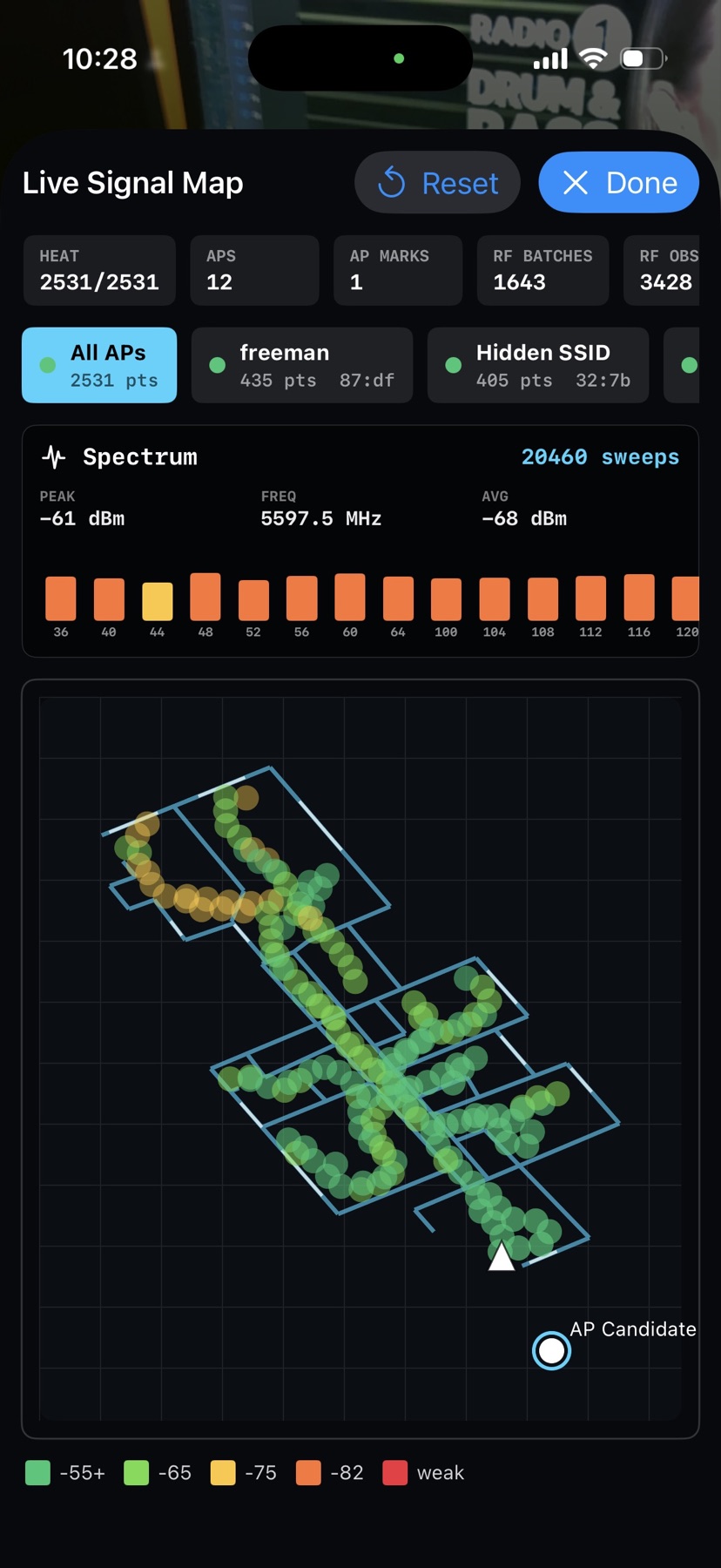
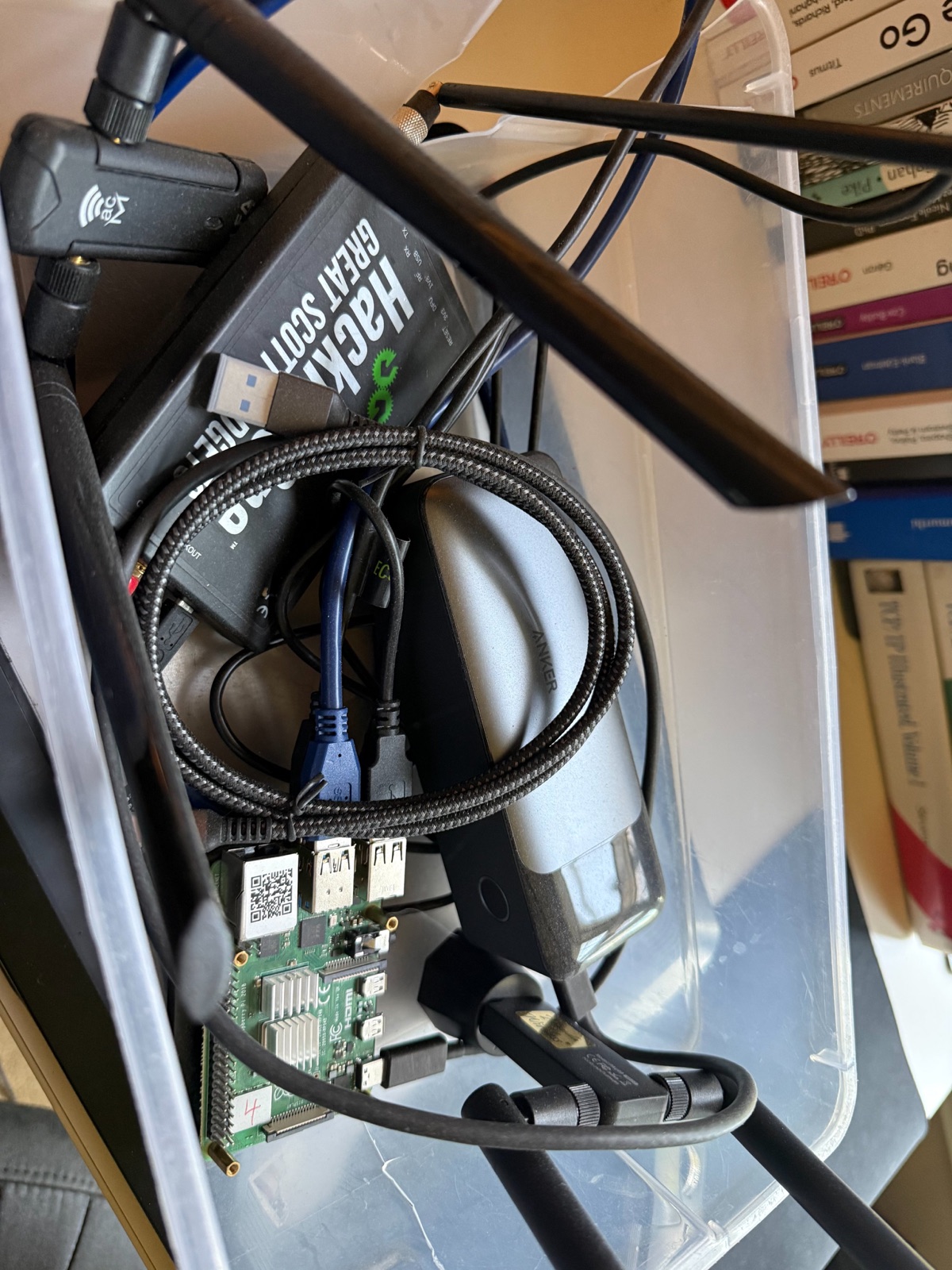
End-to-end field operations workflow
From pocket field kit to living site inventory
Field technicians capture accurate floorplans and dual-band Wi-Fi diagnostics in one walk while ServiceRadar streams coverage maps straight into your central operations console—keeping field teams and NOC engineers aligned in real time.
FieldSurvey capture, live sync & operations workflow
Field Kit (iOS + Sidekick + LiDAR) → Site Telemetry (Signal, Channels & AP Coverage) → ServiceRadar Core (Live Inventory & Topology) → Operations Console (2D/3D Heatmaps)
01 · LiDAR Floorplans
Accurate LiDAR floorplans without waiting on CAD drawings
Site surveys often stall before they begin because floorplans are missing, outdated, or unscaled. FieldSurvey uses Apple LiDAR on an iPhone or iPad Pro to map walls, rooms, and corridors as your technician walks—automatically aligning every Wi-Fi measurement to physical space.
- Pin verified access-point locations on ceiling tiles or closets as ground truth while inferred AP positions display clear confidence scores
- Automatic tracking protection keeps floorplan geometry accurate even in tight hallways or low-light utility rooms
- Reuse saved floorplans for fast repeat audits after an office remodel or AP refresh
02 · Live RF Heatmaps
Spot dead zones and interference before leaving the building
Technicians see signal heatmaps, detected access points, and optional RF spectrum interference right on the iPhone screen as they walk—so coverage gaps are caught on the first visit instead of requiring a second truck roll. At the same time, live heatmaps update inside ServiceRadar for remote NOC engineers.
2D & 3D coverage visualization
Inspect Wi-Fi signal strength and channel overlap across entire floors and pin live heatmaps directly onto executive and NOC site dashboards.
Non-Wi-Fi interference visibility
Add an optional receive-only spectrum analyzer to pinpoint microwave, Bluetooth, or industrial RF noise that standard Wi-Fi scanners miss.
03 · Sidekick & iOS Kit
Open field hardware—without $4,000 proprietary survey dongles
Commercial Wi-Fi survey suites lock teams into expensive proprietary hardware and annual per-seat licensing. FieldSurvey pairs a standard LiDAR iPhone or iPad Pro with an open-source Raspberry Pi Sidekick and off-the-shelf USB Wi-Fi adapters, cutting per-kit hardware costs dramatically across distributed field teams.
Dual-Band Capture
2.4 GHz & 5 GHz simultaneously
Dual USB Wi-Fi adapters scan both bands at once so walks finish faster with complete channel visibility.
All-Day Battery
Compact & USB-C powered
Runs all day off a standard USB-C battery pack that keeps both the Sidekick and your iPhone charged through large campus walks.
Secure Pairing
Hardware-backed tokens
One-time pairing stores credentials in the iOS Keychain and hashed on the Sidekick so field kits stay protected.
Ready for your engineering team to build a kit? Share our step-by-step hardware and build guide on Building FieldSurvey or the FieldSurvey Sidekick documentation .
04 · Site Inventory Sync
One living source of truth for field teams and NOC engineers
Standalone survey tools trap Wi-Fi data in static PDF files that go stale the day an access point is moved or a switch port changes. FieldSurvey writes directly into ServiceRadar so RF coverage stays connected to your live access points, PoE switches, VLANs, and site dashboards.
Connected to switches & site health
Move seamlessly from a weak Wi-Fi zone on a floorplan straight to the access point, uplink switch port, and network health metrics responsible.
Offline-safe for basements & new builds
Every walk is continuously backed up on the device. Walking through stairwells or unprovisioned sites never loses data—sync resumes automatically when signal returns.
FAQs
Why does FieldSurvey pair an iPhone or iPad with an open Sidekick kit?
Apple devices provide industry-leading LiDAR floorplan scanning while the open Raspberry Pi Sidekick captures dual-band 2.4 GHz and 5 GHz Wi-Fi signal data and optional RF spectrum interference—giving field teams full survey accuracy without $4,000+ proprietary dongles.
What hardware do we need for a FieldSurvey kit?
A LiDAR-equipped iPhone or iPad Pro, an off-the-shelf Raspberry Pi powered by a standard USB-C battery pack, and dual-band USB Wi-Fi adapters. An optional receive-only spectrum analyzer can be added to spot non-Wi-Fi interference.
What happens if Wi-Fi or cellular drops mid-walk?
FieldSurvey continuously backs up every walk locally on the device. Walking into a basement, stairwell, or unprovisioned site never loses data—live syncing resumes automatically once connectivity returns.
How do FieldSurvey heatmaps connect to our live network operations?
Coverage maps stream directly into ServiceRadar as technicians walk, where NOC engineers can review 2D and 3D heatmaps live, pin them to site dashboards, and tie weak coverage zones straight to access points, PoE switches, and VLANs.
Can we re-survey a site without re-scanning the floorplan?
Yes. Floorplans are saved directly on the site record in ServiceRadar, so repeat Wi-Fi audits after an office remodel or AP upgrade reuse the existing floorplan automatically.
Where are the FieldSurvey hardware and operator docs?
Full hardware recommendations, setup steps, and field operator guides live in the FieldSurvey Sidekick documentation .
Next step
Bring Wi-Fi site surveys into your living network inventory
Review FieldSurvey hardware kits, multi-floor survey workflows, and site dashboard integration with our team, or launch the live demo.